Navigation
Navigation Bar
The navigation bar provides access to the main functions of ECF. It is visible at the top of all ECF pages.
| Button | Purpose |
|---|---|
|
My ECF |
View documents you have checked out, your favorite cases, your recent actions, and your SSIS assigned cases. See My ECF. |
|
Notifications |
View the notifications that are assigned to you. See Notifications. |
|
Search |
Search for a case or person in ECF. The result is a case or person file with information from the Shared Master Index (SMI) connections to the DHS databases and case file content from the ECF content repository. See Search for a Case or Person. |
|
User Guide |
View the ECF user guide. |
|
Last Visited |
Go directly to the last 10 visited case and person files without doing a search. See Last Visited Cases and Persons. |
|
Settings |
Set personal preferences for working with ECF. See Settings. |
|
User Profile |
View your profile Hennepin ECF roles, DHS SMI roles, and user information or any ECF user’s profile. See Worker Roles and User Information. |
|
Sign Out |
Sign out of ECF and SMI. See Signing Out. |


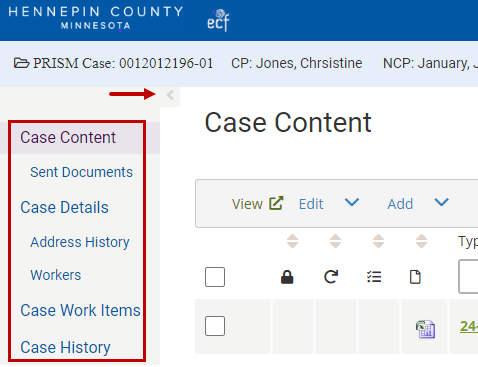
Sidebar Menu
The sidebar menu provides access to the pages of the case and person files.
To hide or show the sidebar menu, click the arrow at the top of the menu.
User Guide Feedback
E-mail Feedback
ECF Support
Immediate assistance: Contact the IT Service Desk (two options): ● Phone 612-348-6662 ● Submit online ticket
Additional resources: ECF Support ● ECF System Status ● Knowledge base ● ECF Sign In
